Showing posts with label Dynamics 365 Business Edition. Show all posts

Thursday, 5 October 2017

Spots Still Available for Upcoming Partner Boot Camp with Progressus Software


Progressus Software, Inc., is hosting a week-long Boot Camp, from October 16-20th in Findlay, OH, which provides a deep dive into the functionality of Progressus Software, as well as a glimpse into what features are upcoming in the product roadmap. All partners are invited! Days one and two are specific to Microsoft Dynamics NAV and Microsoft Dynamics 365 Business Edition. The last three days provide a technical deep-dive into Progressus Software.

Progressus is next-generation Professional Services Automation and ERP software, mobile-enabled and architected for the Microsoft cloud. The solution adds advanced project accounting and project management to the powerful financial management functionality of Microsoft Dynamics 365 to provide the most advanced business management solution for professional services and project-based businesses.

Progressus Software is the largest app on AppSource for Microsoft Dynamics 365 Business Edition. Typical solutions include less than 200 code parts, and Progressus leverages over 800 code parts. Find Progressus Software on Microsoft AppSource here.

The boot camp is not intended to be a replacement for Dynamics NAV training from Microsoft, but rather an intense session of what you need to know to be Dynamics NAV and Dynamics 365 Business Edition knowledgeable for implementing Progressus Software at customer sites. If you are a Dynamics NAV Partner, there’s no need to attend the first two days of this Boot Camp as there is a fee for the first portion of the boot camp for non-NAV partners.

Days three – five are an intense and hands-on deep dive into Progressus Software, taking you from an introductory demonstration of the product to full implementation of everything from quotes, to billing to budgets.

Progressus Software hosts a Boot Camp at least once per quarter. These Boot Camps are held at the Progressus Campus in Findlay, Ohio, and are provided at no cost to our partners. We also offer a “Personal Boot Camp” for those Partners who might benefit from having us come to you, rather than sending multiple people to our campus. There is a fee for the Personal Boot Camps, but we will work with you to make that cost comparable to the time and effort you might spend to send those attendees to Findlay. If this interests you, let’s talk.


Wednesday, 9 August 2017

Progressus Software Approved for Microsoft AppSource


Progressus Software is the largest app to be published on Microsoft AppSource.

Progressus Software today announced that their Microsoft Dynamics 365 for Finance and Operations, Business Edition Application (App) has been published on Microsoft AppSource. Progressus Software is available on Dynamics 365 for professional services firms in need of a comprehensive, cloud-based professional services automation solution.
Progressus is next-generation Professional Services Automation and ERP software, mobile-enabled and architected for the Microsoft cloud. The solution adds advanced project accounting and project management to the powerful financial management functionality of Microsoft Dynamics 365 to provide the most advanced business management solution for professional services and project-based businesses.
The approval of Progressus Software on Microsoft AppSource is a significant achievement. Progressus Software is the largest app approved for Dynamics 365 Business Edition by Microsoft. Typical solutions include less than 200 code parts compared with over 800 leveraged by Progressus.

Read complete post here.


Monday, 17 April 2017

Add Application Area property for D365 App


We need to finish below step in the process of developing the app for financials.

In order to successfully complete the end to end usage scenarios, make sure to set the ApplicationArea for your objects to one of the following values. If the applicationarea is not set to one of these values, the object will not be displayed in Dynamics 365 for Financials. Refer to ApplicationArea Property for more information. 
• #Basic  • #Basic, #Suite  • #Suite • #All

If we have few objects, then we can manually set this property but we have around 250 objects where we need to set this object.

I found below tool in github to add this property using dll.

Thank you so much Ingmar Stieger

You can download the code and create dll using visual studio or you can directly download the dll here

Syntax:
ApplicationArea.exe directory\*.txt -set AREA [-minId nnnnnn] [-maxId nnnnnn]

·        Parameter 1 (* directory\*.txt): Specifies a path and file pattern of text files that should be processed
·        Parameter 2 (-set AREA): Sets all empty ApplicationArea properties to AREA
·        Parameter 3 (-minId nnnnnn): Optional. Process only controls starting with (and including) ID nnnnnn
·        Parameter 4 (-maxId nnnnnn): Optional. Process only controls up to (and including) ID nnnnnn
*Note: Text files can contain one or multiple objects. So you can have either one file per object or multiple objects in one text file.

Example
1.      Export a couple of pages from the C/SIDE client to c:\temp\pages.txt
2.     Set the area to Jobs for all controls starting at ID 1000000000 
      ApplicationArea.exe c:\temp\pages.txt -set Jobs -minId 1000000000 –maxId

It will update the file which we have given in above path.
We can import in to database and check all the fields have ApplicationArea property added.
Once again thank you so much Ingmar Stieger
Please pass it to Ingmar Stieger if someone known him.


Thursday, 16 March 2017

Progressus Software a Project Management Solution


Progressus is next-generation Professional Services Automation and ERP software, mobile-enabled and architected for the intelligent cloud. Progressus provides all the capabilities needed to manage professional services and project-based businesses of any size – operating in any geography. Functionality spans all the important processes in your firm – resource management, project management, sales and marketing, human capital management and financial management to give you unparalleled insight and control of all of your critical business functions. Built on Microsoft Dynamics NAV, Progressus is constructed for cloud deployment, and provides role-based clients optimized for any browser or mobile device.
Microsoft Dynamics NAV is a global business management solution that provides small and midsize organizations greater control over their financials and can simplify all aspects of their company from professional services and project management to supply chain and manufacturing. It’s quick to implement and easy to use, with the power to support your growth ambition. Microsoft Dynamics NAV is available in the cloud on Microsoft Azure, and offers deep interoperability with Office 365.
Progressus adds advanced project accounting, project management and resource management to the powerful financial management functionality of Microsoft Dynamics NAV to provide the most advanced business management solution for professional services and project-based businesses. Progressus offers unique and powerful functionality in these areas:
·         Quick Project Setup
·         Project Budgeting
·         Resource Management
·         Project Monitoring and Analyzing
·         Project Cost Tracking
·         Remote Project Time & Expense Entry & Approval
·         Project Invoicing
·         Project Reporting, Analytics & Forecasting

By leveraging Dynamics NAV as platform, Progressus adds powerful project management to the vast ERP capabilities of NAV without costly or complex integration, including robust Service Management, Supply Chain Management, Manufacturing or Sales and Marketing Management.
“Plumbline Consulting has extensive experience creating solutions for project-based and professional services organizations, and we’re excited to have them bring that expertise to a new offering built on Microsoft Dynamics NAV,” said Paul White, General Manager of Microsoft Dynamics. “We’re also very pleased to announce that Progressus will be available in the cloud on Microsoft Azure through the Microsoft Dynamics NAV managed service for partners.”
“Plumbline Consulting’s depth and breadth of project expertise has allowed us to expand our growing base of solutions to project-based companies. The Progressus Software solution will provide valuable tools to project managers and employees worldwide”, said Joseph Longo, President of Plumbline Consulting.
About Plumbline Consulting
The Plumbline Consulting team has over 30 years history in implementing project-based ERP solutions. Plumbline provides software engineering and consulting services for Microsoft, Microsoft Dynamics® Channel Partners and Microsoft Independent Software Vendors (ISVs). Plumbline offers software development, application support, technology and business process consulting, with a focus on delivering excellence and building lasting relationships. Plumbline also provides Dynamics SL (formerly known as Solomon Software) Product Management, Development and Support services for Microsoft Corporation. The company is headquartered in Findlay, Ohio. More information about Plumbline Consulting can be found at http://www.plumblineconsulting.com.

Email: info@plumblineconsulting.com
Website: 
http://www.progressussoftware.com
YouTube site: 
https://www.youtube.com/channel/UCEJ_7z4gDGr1iz_pGVvAoTw


Friday, 3 March 2017

Plumbline Consulting, LLC Announces the Launch of Progressus Europe


Progressus Europe will be recruiting and training the European Partner Network on Progressus Software.

Plumbline Consulting, LLC is pleased to announce the opening of Progressus Europe and establishing the Partner Program and Partner Network for Progressus Software in the European Marketplace. Progressus Software is an advanced business management solution built on Microsoft Dynamics and designed specifically to meet the needs of professional services and project-based businesses.

Progressus Europe will be headed by Staffan Nilsson, a veteran software professional with experience internationally at multiple Microsoft Partners. Nilsson and his team will be responsible for recruiting and training the European Partner Network, as well as localization of Progressus Software for the individual European countries represented. “Progressus has been in the forefront of building extensive PSA and Project Management capabilities on Dynamics 365 for project-based and professional services organizations. We are excited to have them bring Progressus to Europe,” said Paul White, General Manager of Microsoft Dynamics.

Progressus Software is next-generation Professional Services Automation and ERP software, mobile-enabled and architected for the Microsoft Cloud. Progressus provides all the capabilities needed to manage professional services and project-based businesses of any size – operating in any geography. Functionality spans all the important processes in your firm – resource management, project management, sales and marketing, human capital management and financial management to give you unparalleled insight and control of all of your critical business functions. Built on Microsoft Dynamics, Progressus is constructed for on-premise or cloud deployment and provides role-based clients optimized for any browser or mobile device.

“Dynamics NAV has a deep history of success in Europe and with the expected launch of Dynamics 365, we expect significant growth throughout the region. We are looking forward to having an industry veteran like Staffan launching Progressus Europe,” said Joseph Longo, President of Plumbline Consulting.
Microsoft Dynamics is a global business management solution that provides small and midsize organizations greater control over their financials and can simplify all aspects of their company from professional services and project management to supply chain and manufacturing. It’s quick to implement and easy to use, with the power to support your growth ambition. By leveraging Dynamics 365 as the platform, Progressus adds powerful project management to the vast ERP capabilities of Dynamics.

About Plumbline Consulting
The Plumbline Consulting team has over 30 years history in implementing project-based ERP solutions. Plumbline provides software engineering and consulting services for Microsoft, Microsoft Dynamics® Channel Partners and Microsoft Independent Software Vendors (ISVs). Plumbline offers software development, application support, technology and business process consulting, with a focus on delivering excellence and building lasting relationships. Plumbline also provides Dynamics SL (formerly known as Solomon Software) Product Management, Development and Support services for Microsoft Corporation. The company is headquartered in Findlay, Ohio. More information about Plumbline Consulting can be found at http://www.progressussoftware.com or http://www.plumblineconsulting.com.


Thursday, 16 February 2017

NAV Development Tools Preview – February Update

Welcome to the February update for the Developer Preview. As in the last two updates, MS has fixed bugs reported by us on GitHub issues list (https://github.com/Microsoft/AL/issues) and made other improvements. 
We can see a list of what’s new below.
– Finishing your design work in the client now offers two options on saving, allowing you to save the changes to the tenant for all users, or to save the changes to a file that you can work on later in VS Code. Performance of the designer has improved and is snappier.


– To guide users towards a better page design, we’ve been adding a few rules in the in-client designer. For example, you can only drop media fields onto card part pages. Also, you cannot drop a field under a repeater control, because this is not the design that list pages were intended for.
– Getting started in VS Code has been streamlined. Once you’ve installed the visx file, just enter AL: Go! in the command palette (Ctrl+Shift+P) and you’ll be offered a new folder to build a solution in. The preset values are configured for your Azure Gallery instance and if you’re missing the symbols for the project, VS Code will offer to download them for you. Note, we’ve introduced a shortcut for this too – Alt+A, Alt+L. Enjoy!


– We’ve made improvements in IntelliSense with contextual support for keywords in all objects – and we’ve added autocompletion and IntelliSense for setting values for the CalcFormula and TableRelation properties.
– You can now reference Query objects from the base application. This gives you the ability to declare variables of the type Query and call AL functions on them.
– References by symbols have been implemented meaning that you can find all references in an inline editor. Pressing Shift+F12 on top of a symbol will open a view that lets you jump to all instances of that symbol. Furthermore, selecting a symbol and pressing F2 allows you to rename all instances of that symbol. Note, that symbolic rename is cleverer than text matching and will only change the current symbol. For example, it will replace all instances of variable Foo, but not rename function Foo.
– Two AL variables have been introduced mapping to the HTTP Client and JSON types. Using HttpClient, HttpResponseMessage, JsonObject, JsonToken, and JsonValue will allow you to access Azure functions and other Web services.
– Miscellaneous bugs reported from GitHub have been fixed.
Just like in the last update, we’ve already updated the Azure Gallery so new images will include the update. Again, we’ve designed for compatibility with your existing files so any .al projects you have already will work with the AL Language extension for VS Code. Having said that, changes may need to be introduced at some time so save your work independently as you go.
MS has big ambitions for the next month so stay with us. Thanks again for the bugs – keep them coming and MS will fix them as fast as they can.

MS Announced new capabilities and updated features in the Dynamics 365 for Financials February release

Microsoft announced New capabilities and updated features in Dynamics 365 for Financials February release.

Improved Setup and Configuration

Microsoft making it easier to add industry or third-party extensions to configure Dynamics 365 for Financials to our needs. A new Services and Extensions button was added to the Business Manager and Accountant Role Center. From the list of actions, you can open most setup pages, including service connections and add-ons, with either assisted or manual setup.

Contact Management

Quickly identify and delete duplicate contacts in your customer lists from the new Contact Duplicates tile in the Sales and Relationship Manager Role Center.


Attach an ID like sales person or purchaser codes to an account for better reporting. The sales person or purchaser code can also be set up to be automatically included on new sales or purchase orders. For more information, see How to: Set Up Salespeople and How to: Set Up Purchasers.
Help sales better manage opportunities with pipeline probability tracking and a more consistent experience across your devices. For more information, see Managing Sales Opportunities.
Target your marketing efforts with the ability to filter contacts you want to export from a segment and securely send to a marketing agency.

Human Resources

Maintain a list of employees in your company and add basic information and a picture for each employee.


Multiple Locations

Manage inventory in multiple locations or within different places in your warehouse. In addition, you can now buy and sell from various locations. The Availability per Location window will tell you how to best deliver items to customers based upon inventory location and you can transfer items between locations with transfer orders.

Dynamics 365 for Sales Integration

When you need more advanced customer relationship management capabilities you can easily connect to Dynamics 365 for Sales in a few easy steps. The assisted setup helps you synchronize your data across the two apps, including sales orders, item availability, units of measure, and currencies.

AppSource Extensions

Easily extend your Dynamics 365 for Financials application with industry and third-party extensions. Check out the new extension for payroll from Ceridian and visit AppSource for a complete list of add-on solutions. 

Ceridian payroll


This extension allows you to import payroll transactions from Ceridian HR/Payroll (US) and Ceridian Powerpay (Canada). Aggregated payroll data, including date, payroll account, description, and amount, will be imported to your G/L accounts mapped to the payroll account. For more information, see The Ceridian Payroll Extension to Dynamics 365 for Financials.


Tuesday, 24 January 2017

How to Modify existing field and action properties on a page using Visual Studio Code


I would like to show How to Modify existing field and action properties on a page using simple assignment.

My goal is to make below changes in standard Purchase Order page.

1.     I would like to change existing field name from “Buy-from Vendor No.” to “Vendor No.”

2.     And to make sure that Post action is visible only from Windows Client and not from Web Client.

Purchase Order page looks like below before modifications.

I have created PurchOrderPageExtension.al object as shown in below screenshot.

You can refer my previous blogs to know how to create al objects in detailed.


1st part of the code shows how to modify existing field “Buy-from Vendor No.”

Here I have modified property CaptionML of “Buy-from Vendor No.” field.

2nd part of the code shows how to modify existing action Post properties.

Here I have modified properties CaptionML and Visible.


You can check below part for declaration of global variables and OnOpenPage triggers.

[InDataSet]

PostVisible : Boolean;

Above declaration is equal to Setting IncludeInDataset property of global variables to Yes in previous development.

Now Build Package (Ctrl+Shift+B) and Publish (F5).

Now the Purchase Order page looks like


We can notice that field “Buy-from Vendor No.” changed to “Vendor No.”

Post is changed to “Post visible from Windows Client”.

And Post button is not visible from Web Client.
Make sure that we can modify only few properties as described here
https://msdn.microsoft.com/en-us/dynamics-nav/extension-packages-capability-support-matrix

Friday, 20 January 2017

Adding Logo, privacyStatement and help url's to Extensions using Visual Studio Code


If we would like to add Logo, privacyStatement, help, url and End user License agreement (EULA) links to our extension then we need to fill below settings in app.json file
Place the logo in your extension folder and add it to logo settings.

I have added sample links in all privacyStatement, help, url and End user License agreement (EULA) setup.

You can add proper links as per your scenario.

Now Build (Ctrl+Shift+B) the package and Publish (F5).

Go to Extensions page and notice logo for our extension.

Open extension card and click on any privacyStatement, help, url and End user License agreement (EULA) links which opens links we provided in above setup.

We can also enter description of our extension in above setup which is shown in Extension Card.

If we don’t set these setup’s in app.json then no links will be opened when we click in extension card and default image is added to extension like

Monday, 16 January 2017

NAV Development Tools Preview – January Update

Microsoft announced an update to the developer tools preview.

The update will be applied automatically to the Azure Gallery and any new images taken will automatically include the updated version. Code written from the December update is expected to work, however, please note that between versions code needs to be moved to the new VM and extensions must be recompiled and redeployed which will result in a data loss. Use http://aka.ms/navdeveloperpreview to create a version of the new image.

The following is included in the update

– Fixed various bugs reported by the community in the in-client designer.

– We can now reference Report and XMLPort objects from the base application. This gives us the ability to use these objects in the RunObject property, as well as, declare variables of the types Report and XMLPort, and call AL functions on them.

– Improved IntelliSense for Pages and Tables. IntelliSense will offer keywords in Pages and Tables. The supported keywords will be offered in the correct context and are intended to help build the object correctly.


– IntelliSense for attributes. The list of available attributes will be displayed after typing ‘[‘. Each attribute will also include signature help showing the number and types of expected parameters. Also, IntelliSense for the EventSubscriber attribute offers lookup for the event name and the field/action name parameters which helps discover the available event publishers.

– Fixed miscellaneous bugs reported to Microsoft. Issues submitted to the GitHub project issue list that have been fixed have been marked as included in the January update.

Microsoft would like to thank all those who registered comments or issues and at the same time, remind you that the best way to give feedback is through the https://github.com/microsoft/al/issues project.

Thursday, 29 December 2016

Adding new field to page (without adding to table) using new Visual Code

We will learn how to add new field to page which is not available in table using new visual studio code.

Sample requirement is to add a Boolean field in Job Card page to check whether there are any comments available without adding field to table.

1.     Open Visual Studio Code

2.     Create new project/folder if you want to develop as a new extension or open folder in which you want to add this feature. I am using same previous folder “ReasonCodeforLostJobQuote”.

3.     Create new file

4.     Enter Name “PagJobCardExtCheckComments.al”

5.     Enter “tpageExt” which adds sample page extension snippet.

6.     Change ID, Name and Extends as below

7.     Enter “tfieldpage” which adds sample Page field snippet under Layout section.

8.     Replace “Myfield” with “Comments”

9.     We need to add “SourceExpr” in place of “Source”

10.                        Save the file and create a Codeunit which checks whether Comments available or not.

11.                        Create New file

12.                        Enter “CodCheckComments.al” in file name

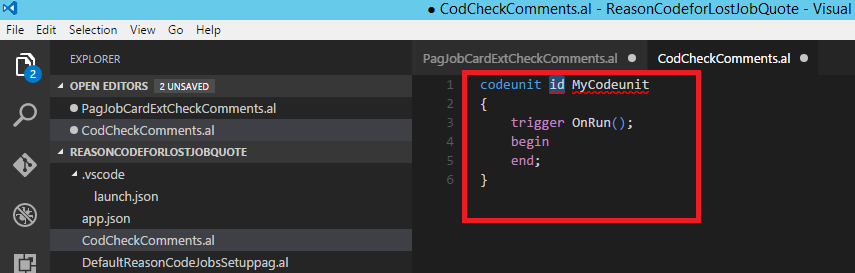
13.                        Enter “tcodeunit” which adds sample Codeunit snippet

14.                        Change ID, Name

15.                        Enter “tprocedure” which adds sample Procedure/Function Snippet.

16.                        Modify the function/Procedure as shown

17.                        Go back to above page PagJobCardExtCheckComments.al and Modify as below

18.                        Build the Package (Ctrl+Shift+B) and Publish (F5)

19.                        Open Job Card.

20.                        We can notice new field Comments in General tab But Check mark for Field is missing. Reported hear. UPDATE: Issue is fixed now
https://github.com/Microsoft/AL/issues/46


21.                        Open Comments action from Navigate and enter some text

22.                        Click OK in Comments Sheet.

23.                        Comments field is True which indicates some comments exist for this job.

This is how to add field to page without adding to table.
Stay tuned.