Showing posts with label Madeira. Show all posts

Monday, 3 October 2016

Bye Bye Project Madeira


It seems it’s no more “Project Madeira” and Welcome to Official "Dynamics 365 for Financials".

Microsoft still need to optimize it in Welcome Screen etc..


Thursday, 29 September 2016

New and updated capabilities in the September update of Project "Madeira"


More flexibility in sales processes

This update adds more flexibility in what you sell:

Nonstock items

You can now set up nonstock items - items that you offer to customers but do not maintain inventory for. For more information, see How to: Work with Nonstock Items.

Drop shipments

You can now mark an item for drop shipment on a sales order and immediately create a purchase order for the item. This way, you can sell an item to a customer, purchase it from the vendor, and have it shipped directly from your vendor to your customer. For more information, see How to: Purchase Products for a Sale.


Categorize items in your inventory

With this update, you can create a hierarchy of item categories and assign item attributes to each item category. When you add items to a category, they will inherit the attributes on the category. This ensures a common set of attributes on related items, speeds up the assignment of attributes to similar items, and allows filtering and navigating related items based on the category. For more information, see How to: Categorize Items.


Send purchase orders to vendors

Now you can enter purchase orders within Project "Madeira". You use purchase invoices to record the cost of purchases and to track accounts payable. With this update, you can send an order to your vendor and track this in Project "Madeira". For more information, see How to: Record Purchases.


Better quality incoming documents

You can now easily correct errors in the scanned documents before you receive the resulting document - this way, you'll train the service to avoid the errors going forward. You use the new Lexmark ICS online experience to visually train and validate the processing of PDF and image files for incoming documents, such as vendor invoices. From each incoming document record, you can now link directly to the online extracted document to validate the Optical Character Recognition (OCR) result and train the service with your corrections. A new Role Center cue allows you to monitor incoming documents that await your OCR validation. For more information, see How to: Use OCR to Turn PDF and Image Files into Electronic Document.

We have also added the much requested support for also extracting line details when we send PDF or image files on incoming documents to Lexmark ICS, the 3rd-party provider of OCR services. You can now create, for example, purchase invoices with multi-line details instead of just one line with the total. To map item numbers and names on an incoming document to your representation of the vendor's items, use the existing Item Cross Reference feature. To map vendor-specific text on an incoming document to the vendor's G/L account, use the existing Text-to-Account Mapping feature.

Friday, 16 September 2016

Welcome to the assisted Data Migration in Project Madeira


We can have master data like Customers, Vendors and Items in project Madeira with few clicks of assisted data migration setup.

Open “Assisted Setup & Tasks” action from Business Manager Role center


Or use search option


Select “Migrate Business Data”


It will open “Welcome to the assisted Data Migration” window.
 

Click Next
Select “Import from Excel” as data source.
 

And click Next
 

Here we need to perform some steps
1.     Download the template
2.     Fill in the template with your data
 

If we have entered No. filed in excel then it will be used in Madeira. Otherwise Madeira will New No. as per No. Series.

Click Next

Confirmation message will show that we have not specified import settings for the data source.
We can ignore it.
 

Press Yes.
Import from Excel window will open
 

Click Choose
Select the excel in which we have added our data

Madeira will read the Excel and show us the no. of records we are importing to database.
 

Click Next to apply the data to database.
Madeira will show message with processed details.
 

Click OK

That’s it!
 

Click Finish

Close the assisted setup window.

Go to Customers     

You will see imported records from excel
It has added 60000 and 70000 as we have given No. in excel
And C00020 is added by Madeira with no. series.

That is how easy it is to get started with Project Madeira.

Monday, 1 August 2016

Item Inventory Posting in Project Madeira


We may need to add inventory to item in many cases. How do we add Inventory to Item?

By posting Purchase order or Item journal.

Now, we have a smart way to add inventory in Project Madeira.

Go to Item List and Create a New Item
1001 – Test


Check the Quantity on hand and Item Ledger Entries for the Item


Now click on the arrow > of field Quantity on Hand


It will open a new page “Edit – Adjust Inventory”


Enter value in New Inventory (ex: 10)

Click OK

If there are any errors in posting the inventory then it will show error as below


Correct the error and redo the process
Now Inventory is available as shown in field “Quantity on Hand”


Open Item ledger entries and there will be an entry with positive adjustment


Now go back to same “Edit – Adjust Inventory” and reduce the quantity (ex: 7)


Click OK


Now the inventory is become 7


Open Item Ledger entries and we have new negative adjustment entry with Quantity 3


Thursday, 14 April 2016

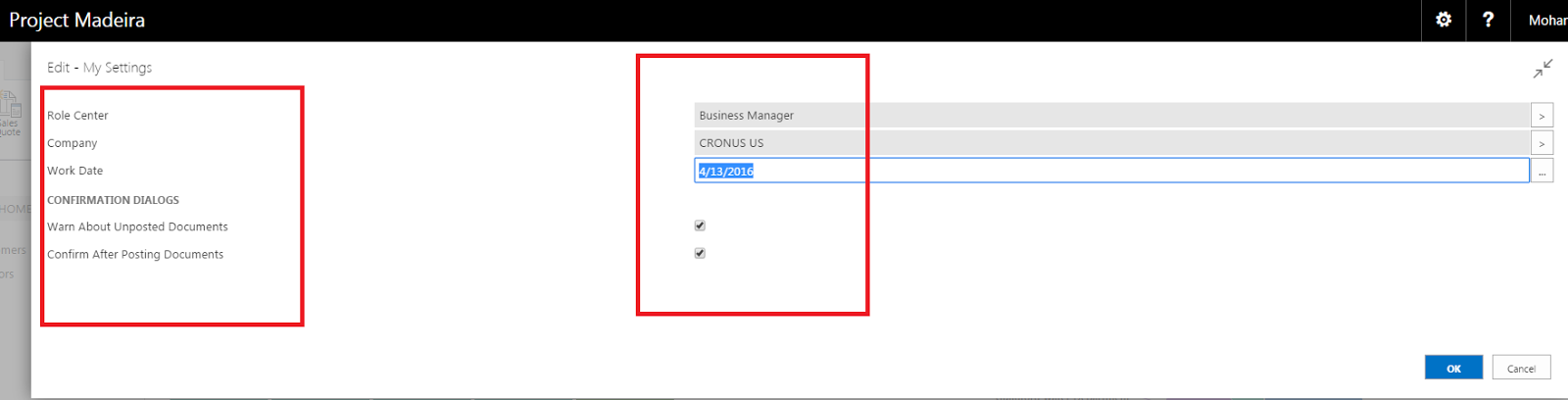
Madeira Preview - Improvements - My Settings Page


We have below options in Madeira preview "My settings" page.


We can change the Role center from this page itself and some confirmation dialogue setup’s.


Madeira Preview - Improvements - Managing Extensions


As we all are aware of Extensions from NAV 2016.

We can manage Extensions from business Manager Role center.

We need to only publish first and we can install/uninstall extensions from this page.


Madeira Preview - Improvements - Page Views


We can see pages in 3 different views (Bricks, Tiles and List).

Ex: Item List


Some pages are available with only 2 ways (Bricks and List). This can be due to Images are not available. (Ex: Vendor List)


Wednesday, 13 April 2016

Project "Madeira" Public Preview Now Available


Today Microsoft has announced the public preview of code name Microsoft Project "Madeira," a completely reinvented business management solution for small and midsize businesses (SMBs). 
Project "Madeira" connects business processes with the productivity tools in Office 365 to help SMBs grow sales, manage finances and streamline operations. Project "Madeira" is public cloud service (Software as a Service) running on Microsoft Azure. Customers can access the service on the Web, or using apps for Windows, iOs or Android devices. 
Project "Madeira" preview is available in the United States market today. The service is scheduled to become generally available in the U.S. during the second half of 2016, with other countries to follow. 
So what do Microsoft mean by completely reinvented?  
·        A new level of productivity – Project "Madeira" reduces time wasted switching back and forth between business applications and email. It automatically identifies business context such as invoices and quote requests within Outlook, and presents the user with the tools and data needed to take immediate action – all without leaving Outlook. If you know how to use Office, then you know how to use Project "Madeira."  
·        Cloud first – Project "Madeira" is designed from the ground up as a true multi-tenant public cloud service on Microsoft Azure, meaning SMBs can get up and running quickly, manage costs and rest assured knowing their data is more protected in hyper-scale, enterprise-class datacenters. 
·        Mobile first – Project "Madeira" is built for a mobile workforce, with a consistently great user experience across almost any device or form factor. Customers can access the service through a Web browser, or using apps for Windows, iOS or Android devices. 

·        Built for growth  Project "Madeira" is a comprehensive business management solution for growing companies with roughly 10 to 100 employees. These are companies that need more than the simple financial and accounting tools they started with, but aren’t yet ready to make a big investment in a customized enterprise resource planning (ERP) system. Without sacrificing ease of use or speed of setup, Project "Madeira" offers a fully powered business management solution in the cloud, with capabilities spanning financials, dimensions, sales and purchase management, inventory, CRM (opportunity management), multi-currency, and business insight. In addition, Microsoft’s ecosystem of independent software vendors are building rich extensions for Project "Madeira." These extensions cover horizontal add-on functionality as well as full industry-specific vertical solutions. They will be available in a marketplace soon.  

Monday, 12 October 2015

Sicily, Crete, Corfu and next Madeira...


Microsoft starts development of next versions with Code Names

If you recall Code names of earlier versions then

NAV2013 is Sicily
NAV2015 is Crete
NAV2016 is Corfu

And Next version code name is Madeira.


Let’s hope Microsoft will come with a lot of game changing new features in “Madeira”. Good luck Microsoft.

Let’s enjoy NAV2016 for now.


Madeira, an autonomous region of Portugal, is an archipelago comprising 4 islands off the northwest coast of Africa that were settled in the 1400s. It’s known for its namesake wine and warm, subtropical climate. Popular outdoor pursuits include hiking along old levada (aqueducts) in the mountains, golf, surfing and scuba diving at sites such as the Garajau Marine Nature Reserve.
o   Capital: Funchal
o   Area: 801 km²
o   Population: 267,785 (2011)